iAPS
Operate-Folder-Updates
Overview
Overview
What is Open-iAPS?
Getting Started
Compatible devices
iPhone
iOS version and Developer Mode
Automatic Updates
Turn off Automatic Updates!
Battery Health
Apple Watch
Compatible Pumps
Omnipod Pumps
Omnipod Eros
Omnipod DASH
Omnipod 5
Medtronic Pumps
Medtronic Pump Model
Medtronic Pump Firmware
Medtronic Pump Differences
Finding a Medtronic Pump
Safe Purchasing
Pump Supplies
Compatible CGM
Nightscout
xDrip (xDrip4iOS)
Dexcom G5/G6 (and ONE)
Dexcom G7
Glucose Simulator
Libre Transmitter
Supported Sensors
Unsupported sensors
Glucose Direct
Medtronic Enlite
Device Configuration
Device Configuration
Closed loop
Devices
Pump
CGM
Watch
Transition from other closed loop solutions
Introduction
Coming from AndroidAPS
What does AndroidAPS have that Open-iAPS doesn’t?
What does Open-iAPS have that AndroidAPS doesn’t?
Why should I switch from AndroidAPS to Open-iAPS?
Coming from iOS Loop
What does Loop have that Open-iAPS doesn’t?
What does Open-iAPS have that Loop doesn’t?
Why should I switch from Loop to Open-iAPS?
How does Open-iAPS deal with those common issues?
What’s all that talk about changing the way I think?
Mealtime strategy
Coming from commercial closed loop systems
I want to try Open-iAPS. How do I proceed?
Watch the Loop N Learn Videos on Open-iAPS:
Basic Settings
Autotune
What is Autotune?
How does it work?
Important note on Dynamic Settings
How does it differ from Autosens?
Should I enable Autotune?
Basal Profile
Setting
Insulin Carbohydrate Ratio
Setting
Pump Settings
Delivery Limits
Max Basal
Max Bolus
Max Carbs
Duration of Insulin Action
Target Glucose
Compatible CGM
Nightscout
xDrip (xDrip4iOS)
Dexcom G5/G6 (and ONE)
Dexcom G7
Glucose Simulator
Libre Transmitter
Supported Sensors
Unsupported sensors
Glucose Direct
Medtronic Enlite
Pump
Apple Health
Fat and Protein Conversion
Convert Fat and Protein
Conversion Settings
Delay In Minutes
Maximum Duration in Hours
Interval in Minutes
Override With A Factor Of
Visualization and Monitoring
Nightscout Introduction
Open-iAPS Setup
Notifications
Glucose
Show glucose on the app badge
Always Notify Glucose
Always play alert sound
Also add source info
Low
High
Carbs Required Threshold
Advanced Settings
Autosens, Dynamic ISF/ICR, and Adjust Basal
Autosens Mode
Dynamic ISF
Advanced Information
Dynamic CR
Adjust Basal
Advanced Information
Final Thoughts
Sigmoid Function
What is it?
Dynamic Settings
Enable Dynamic ISF
Enable Dynamic CR
Adjustment Factor
Use Sigmoid Function
Weighted Average of TDD. Weight of past 24 hours:
Adjust basal
Threshold Setting (mg/dl)
FreeAPS X
Glucose Units
Remote Control
Recommended Bolus Percentage
Skip Bolus screen after carbs
Display HR on Watch
OpenAPS Main Settings
Insulin Curve
Max IOB
Max COB
Max Daily Safety Multiplier
Current Basal Safety Multiplier
Autosens Max
Autosens Min
OpenAPS Other Settings
Rewind Resets Autosens
Use Custom Peak Time
Insuln Peak Time
Skip Neutral Temps
Unsuspend if No Temp
Suspend Zeros IOB
Bolus Snooze DIA Divisor
Min 5m Carbimpact
Autotune ISF Adjustment Fraction
Remaining Carbs Fraction
Remaining Carbs Cap
Noisy CGM Target Multiplier
Open-iAPS SMB Settings
Enable SMB Always
Max Delta-BG Threshold SMB
Enable SMB With COB
Enable SMB with Temptarget
Enable SMB After Carbs
Allow SMB With High Temptarget
Enable SMB With High BG
… When Blood Glucose is Over (mg/dl)
Enable UAM
Max SMB Basal Minutes
Max UAM SMB Basal Minutes
SMB DeliveryRatio
SMB Interval
Bolus Increment
Are SMBs Allowed?
By following the flow chart above, you can see which combination of settings will allow SMBs.
Here is the order of settings Open-iAPS uses when deciding whether to enable or disable SMBs:
OpenAPS Targets Settings
High Temptarget Raises Sensitivity
Low Temptarget Lowers Sensitivity
Sensitivity Raises Target
Resistance Lowers Target
Advanced Target Adjustments
Exercise Mode
Half Basal Exercise Target
Using Open-iAPS
Build
Build Trio with GitHub
One-Time Update to Display Branch And Commit in Testflight
Update Trio with GitHub
Distribution Certificates
Build Trio with Xcode
Build Trio with Script
Build Trio
Build Related Apps
Run Maintenance Utilities
Customize Trio
Build Errors
xDrip4iOS or Glucose Direct as CGM Source
xDrip4iOS
Glucose Direct
Alternative Branch
Update Trio with Xcode
Update Trio with Source Control
Customizations
Bypass Authentification for Bolusing
Omnipod: Add Extra Insulin on Insertion
Dash
Eros
Confirm Bolus Faster on Apple Watch
Add Custom Icon
Interface
Main Screen
Status
Graphs and Statistics
Actions
Temp Target
Exercise
Pre-Meal
Troubleshoot
Site Change and Site Failures
Site Change
Site Failure
Low Treatment
Rebound Lows
Highs after meals
Fast Rise
Persistent High After Meals
Fast Rise, Then Low
Resources
Other AIDs
Citations
OpenAPS Documentation
AndroidAPS Documentation
Loop Documentation
Community Support
Citations
iAPS
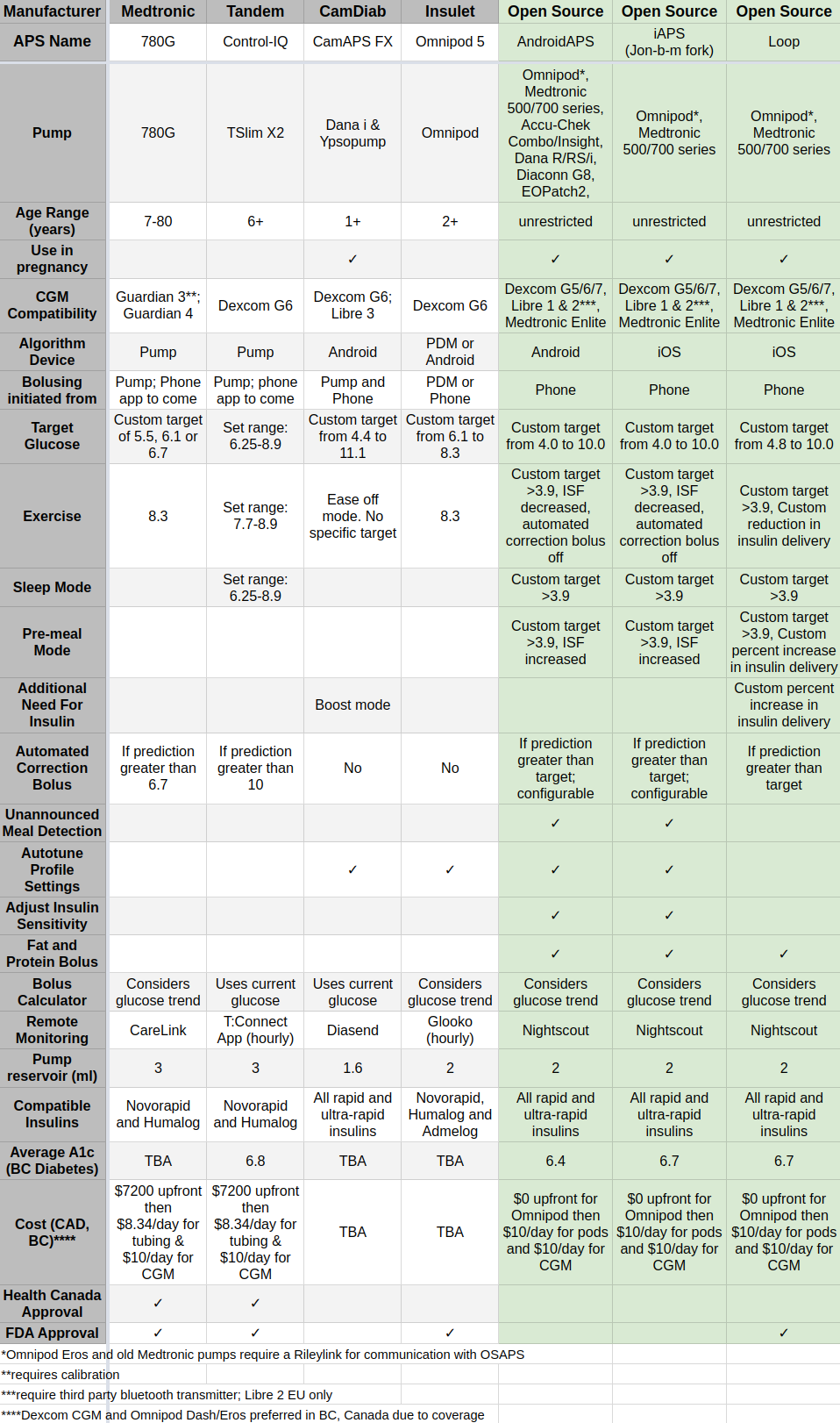
Comparison Table of Automated Insulin Delivery Systems
Edit on GitHub
Comparison Table of Automated Insulin Delivery Systems